Exploring Umbraco alternatives and migration options in 2026


Umbraco still works really well for many organisations especially those still using Microsoft.
But some teams find it restrictive, slow to update, too reliant on developers etc. Due to their flexibility and ease of editing, platforms like WordPress, Webflow and Contentful have gained popularity.
Here at CreativeWeb, we help teams review their existing Umbraco setup and help move over to systems that support day-to-day marketing and make content effective.
Why organisations still choose Umbraco
Umbraco has a strong technical foundation and it runs on modern .NET. It integrates cleanly with Microsoft environments and it now offers a headless mode through the Content Delivery API.
For companies with internal development teams, it provides flexibility and control that other CMSs might not.
For multilingual or enterprise-level sites Umbraco still performs well but it needs to be maintained correctly.
Many businesses are re-thinking their CMS choices with content management and marketing becoming more collaborative and the CMS needs to keep up.
Common challenges that teams report with the Umbraco platform
It has a rigid design structure
Older versions often use block-based layouts that are hard to change. Design teams report feeling limited by the CMS; they are unable to create fluid and modern sections without a developers input. This slows down changes and massively restricts the creative flexibility.
Editing and campaign creation
Marketing teams find everyday updates in Umbraco difficult because adding pages or adjusting layouts typically need a developer. When fast campaign turnaround is key, this becomes a bottleneck. Some teams even use separate landing-page tools to work around these issues.
Time and cost of updates
Because Umbraco typically requires .NET skills, the pool of available developers is smaller than a CMS like WordPress. This often results in longer lead times and much higher costs. It is not always a negative but it is a consideration if your marketing or content teams want more flexibility and control.
How the CMS market looks in 2026
According to W3Techs, WordPress still dominates the CMS landscape, powering about 43% of all websites. Platforms like Shopify, Wix, Squarespace, Joomla, Drupal and Webflow hold smaller shares (but these are growing!).
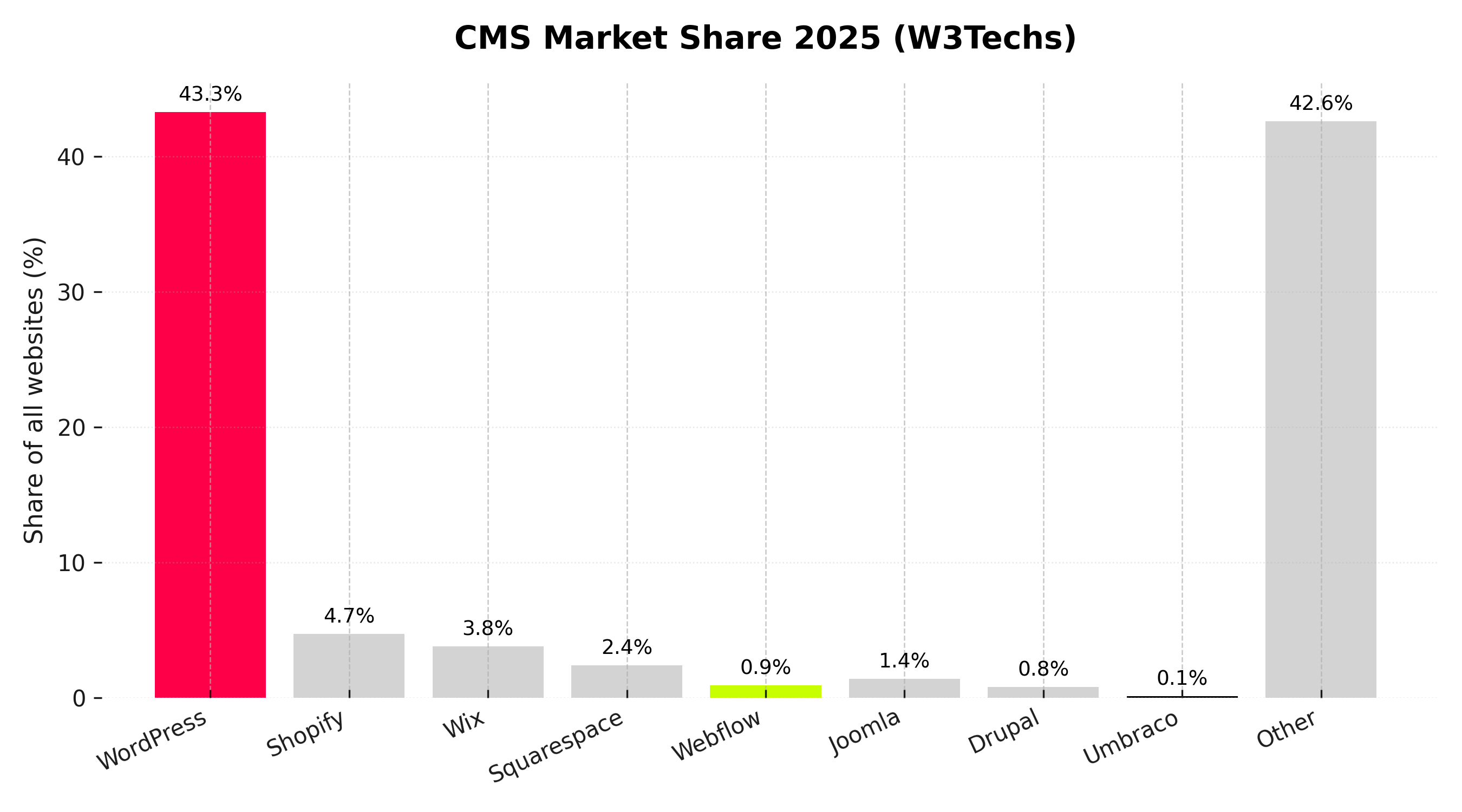
The chart above shows current CMS usage trends and as you can see WordPress leads by a big margin. Shopify and Wix have gained popularity with small businesses and eCommerce brands, while Webflow is seeing steady growth among design-led agencies and start-ups.
Beyond the major platforms, many smaller CMSs hold modest shares of the market. The list below summarises a few, based on 2025 W3Techs data:
Breakdown of additional CMS usage
- Shopify is 4.7% of all websites
Super popular with online shops because it’s got everything built-in – checkout, hosting, the lot. You basically just plug in your products and go. - Wix is 3.8%
Easy drag-and-drop stuff, great for small biz owners or anyone just getting started. You don’t really need to know how to code. - Squarespace is 2.4%
A favourite with creatives and small service brands – it looks nice out the box and it’s simple to manage too. - Joomla is 1.4%
Bit old-school now, not many new sites are using it but you still see it hanging around on older projects. - Drupal is 0.8%
More for big, complicated websites – stuff like universities or gov sites that need loads of structured data. - Webflow is 0.9%
Really slick CMS, made for designers and marketers who want more control but don’t wanna mess with code too much. - Tilda is 0.9%
Becoming more popular lately, especially with design agencies and folks over in Eastern Europe.
Duda, GoDaddy Builder & Adobe Experience Manager are under 1% each
Still used here and there, but not massive. Mostly for niche projects or bigger companies with very specific needs.
These figures help explain why ‘other’ remains a large category. Thousands of smaller or custom CMS exist with many built in-house or using frameworks like Laravel, React or Django.
Alternatives that are worth considering
When businesses move away from Umbraco the alternatives they consider depend on different factors like team size, technical skills and marketing goals. Here are three of what we think will be the most common options in 2026:
| Platform | Best for | Strengths | Considerations |
|---|---|---|---|
| WordPress | General business and marketing teams | Huge ecosystem, strong SEO, flexible editing, plugins for multilingual | Needs proper setup and maintenance |
| Webflow | Design led teams and fast campaigns | Visual control, modern UI, strong animation and design options | Less suited to heavy integrations or complex data |
| Contentful | Enterprise and multi channel content | Headless, scalable, developer flexibility | Higher cost and technical setup, often paired with another CMS for marketing layer |
WordPress
Powering over 43% of the web, WordPress offers flexibility and its easy to use. Its vast plugin library supports everything from SEO to multilingual content. When set up properly, it delivers strong performance in both search/visibility and usability.
For examples of high-performing WordPress sites, see our WordPress web design service page.
Webflow
Webflow is a favourite among design-led teams who want full visual control without diving into heavy code. It supports animations, responsive layouts, and a clean editing experience. While it’s not ideal for complex integrations or large datasets, it’s perfect for fast-moving campaigns and modern, design-focused websites.
Contentful
Contentful is a headless CMS built for enterprises that need to push content across multiple channels like websites, apps, and more. It gives developers lots of flexibility and scale, but the setup is more technical and often comes with higher costs. Some teams take a hybrid route: using WordPress for the marketing layer and Contentful behind the scenes to power other systems.
Considering a move away from Umbraco?
CreativeWeb helps teams migrate without losing rankings or momentum. We handle audit, mapping, redirects, build, and training.
Book a migration callDoes Staying with Umbraco Still Make Sense?
If your team has strong developers and you’re already deep into the Microsoft stack, Umbraco can still be a great fit. It handles multi-language content well, works with headless setups and offers a lot of control especially if your devs are fluent in .NET.
But if your content team is constantly waiting on developers just to make basic changes, that’s a red flag. In that case, switching to something more intuitive might save everyone time and frustration.
In the end, it’s less about what platform you’ve used in the past and more about what actually works for your team now.
Migration Doesn’t Always Mean a Redesign
If you’re moving away from Umbraco, you’ve got two main options:
Rebuild with Your Existing Design
This path keeps your current look but moves it into a more flexible CMS. It’s a solid choice if your design still fits your brand and performs well. It can also save time and cut costs. Our web design team can help assess whether your layout’s worth reusing.
Redesign and Rebuild
If your site feels a bit dated, migration is a great opportunity to modernise. You can refresh the visuals, improve accessibility and streamline navigation while switching to a CMS that gives your team more control.
What a smooth migration looks like
Google’s official site-move documentation explains how to preserve rankings during a migration. Key actions include implementing 301 redirects, maintaining URL structures where possible, and testing everything before go-live.
At CreativeWeb, our process typically includes:
- Content and URL mapping, including redirects and metadata migration.
- Building and testing templates in the new CMS.
- Checking performance, accessibility and structured data validation.
- Training teams on editing and content workflows.
Handled correctly, migration does not have to cause ranking loss or downtime. Our website audit helps identify any SEO or performance risks before migration begins.
How the development landscape is changing
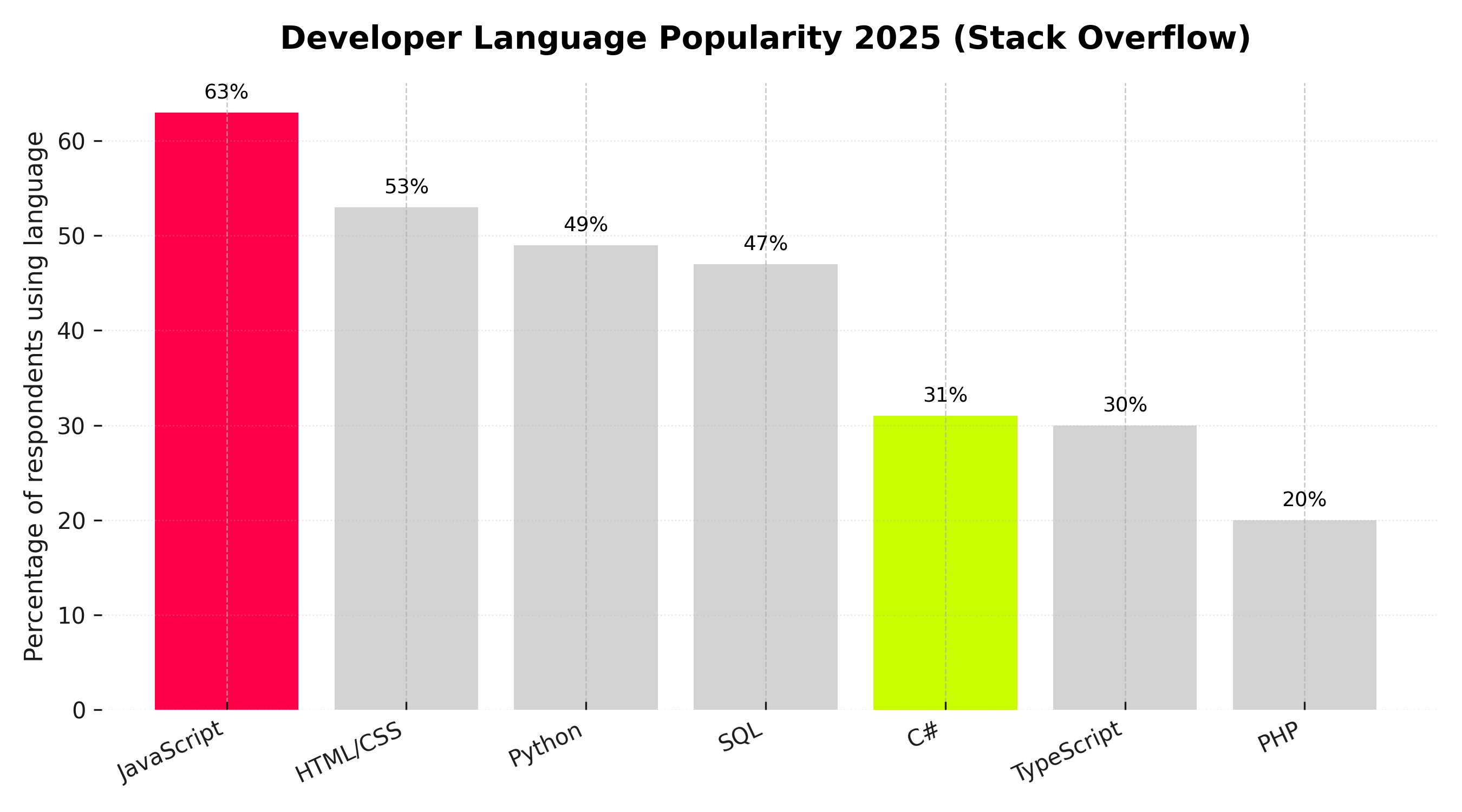
According to the 2025 Stack Overflow Developer Survey, JavaScript remains the most widely used language, with HTML, CSS, and Python close behind.
C# still plays a key role in enterprise and Microsoft-heavy environments. However, its developer base is smaller than that of JavaScript frameworks. This difference helps explain why platforms like WordPress and other JavaScript-based systems tend to evolve more rapidly. enterprise and Microsoft-based environments. However, its developer pool is smaller than that of JavaScript frameworks. This gap helps explain why platforms like WordPress and JavaScript-based systems often evolve more quickly.
Signs it might be time to re-evaluate
You may not need to move away from Umbraco immediately. However, it’s worth reviewing your CMS if:
- Simple content updates are taking longer than expected.
- Campaigns or landing pages are requiring a developers input.
- Performance in SEO or visibility has declined despite good content.
- Internal teams are struggling to collaborate effectively.
If this sounds familiar… switching to a system that supports marketers and editors directly can pay off in both time and cost.
Key takeaway
Umbraco does still remain a reliable CMS for organisations BUT only with the right technical setup. For teams that want faster editing, improved SEO control and lower maintenance costs – alternatives like WordPress, Webflow, and Contentful are becoming more attractive.
Start with a website audit
If you’re not sure whether a move makes sense, start with a website audit to get a sense of how your site’s doing – its structure, speed and whether it can grow with you. Then you can figure out if it makes sense to stay as is, do a redesign or switch to a new setup.
FAQ's
Is Umbraco still a good choice in 2026?
Yes for teams with .NET skills, complex permissions, or deep Microsoft integration. It is less friendly for fast marketing workflows.
Did this answer your question? YesThat’s great glad we could help! Start a ProjectNoNo problem, one of our experts can give you a more in-depth answer. Ask our ExpertsWhy do teams switch from Umbraco to WordPress or Webflow?
To reduce developer dependence, speed up landing page creation, and gain richer SEO tooling with lower ongoing costs.
Will a migration hurt our SEO?
Handled correctly, no. Preserve URL structure where possible, ship a full 301 map, verify parity, and monitor in Search Console.
How long does a CMS migration take?
Typical 6 to 12 weeks for mid-sized sites. Enterprise or multilingual builds take longer due to approvals and testing.
Did this answer your question? YesThat’s great glad we could help! Start a ProjectNoNo problem, one of our experts can give you a more in-depth answer. Ask our ExpertsWhat does a safe migration plan include?
Content inventory, redirect map, template parity, structured data parity, performance targets, UAT, and a measured launch window.
Can we keep our current design and just change CMS?
Yes. A like-for-like rebuild reduces risk and cost, then you iterate on design once editors have better tools.
Which is better after Umbraco: WordPress, Webflow, or Contentful?
Depends on needs. WordPress for flexibility and plugins. Webflow for design-led marketing teams. Contentful for headless and multi-channel.
Did this answer your question? YesThat’s great glad we could help! Start a ProjectNoNo problem, one of our experts can give you a more in-depth answer. Ask our ExpertsHow much does it cost to move off Umbraco?
Varies by size, templates, and integrations. Costs track the number of layouts, languages, and custom components to reproduce.
What happens to media and documents in Umbraco?
They are exported, deduped, relaunched on a consistent URL path, and re-linked during content import to avoid broken assets.
Can we move from Umbraco to a headless setup?
Yes. You can go headless with Contentful or a WordPress headless build if you need apps or multiple front ends.
Will editors gain more control after the move?
That is the goal. We provide pattern-locked, accessible blocks so your team can build pages without breaking design rules.
Did this answer your question? YesThat’s great glad we could help! Start a ProjectNoNo problem, one of our experts can give you a more in-depth answer. Ask our ExpertsWhat about multilingual and right-to-left content?
Supported in all the target stacks. Plan language slugs, hreflang, translation workflow, and test diacritics and RTL layouts.
Do we lose our forms, CRM links, or single sign-on?
No. We re-implement forms and integrations, or replace them with supported equivalents. SSO is scoped early to avoid surprises.
Is WordPress secure enough for enterprise?
Yes with proper hardening, managed hosting, updates, least-privilege roles, WAF, and CI-based deploys.
Did this answer your question? YesThat’s great glad we could help! Start a ProjectNoNo problem, one of our experts can give you a more in-depth answer. Ask our ExpertsCan we improve Core Web Vitals during migration?
Yes. Set budgets for CLS, LCP, INP, remove unused scripts, defer third-party tags, and test on real devices.
How do you prevent content freeze delays?
Short freeze window, delta import for late edits, and a clear cut-over plan with rollback.
Do we need to rebuild every page?
No. Templates cover 80 to 90 percent of pages. The rest are migrated by import scripts or light manual clean-up.
Did this answer your question? YesThat’s great glad we could help! Start a ProjectNoNo problem, one of our experts can give you a more in-depth answer. Ask our ExpertsWhat metrics prove a successful migration?
Stable impressions and clicks in Search Console, no spike in crawl errors, equal or better Core Web Vitals, and faster content throughput.