What makes a good design? This is a very subjective question. Many would say cool animations, fun interactivity or engaging visuals, but by themselves, do these answers help the user with their needs? A better question would be to ask, what makes a good user-centred design?
User Experience and Usability are essential to allow users the best possible results from their journey on a site, understanding your users is more important than understanding the technology behind the website.
In this article, I will summarise some of the key processes and principles for UX and Usability to allow you to gain a stronger understanding of what user-centred design involves, and how it benefits you and your users.
What is User-Centred Design?
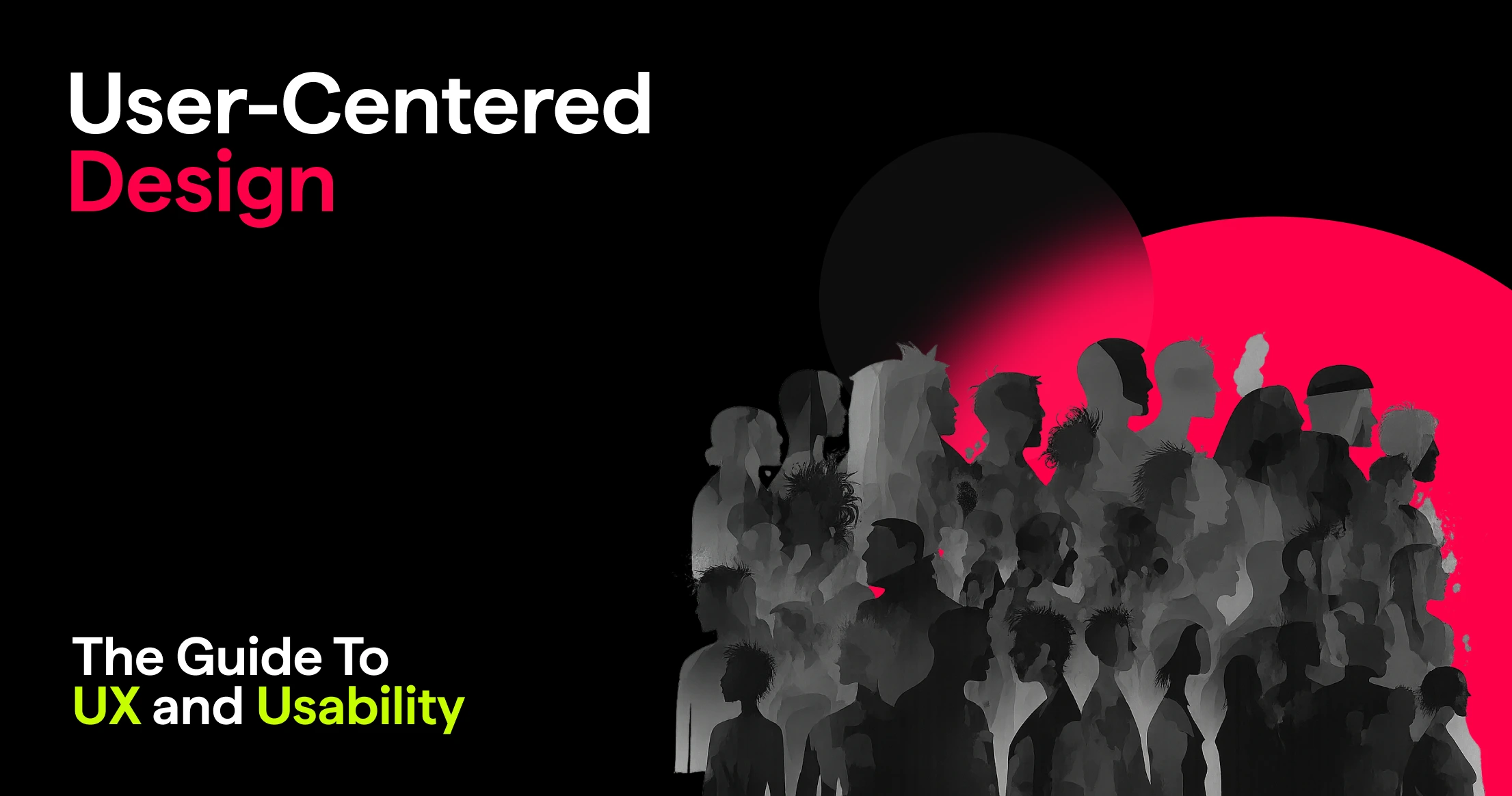
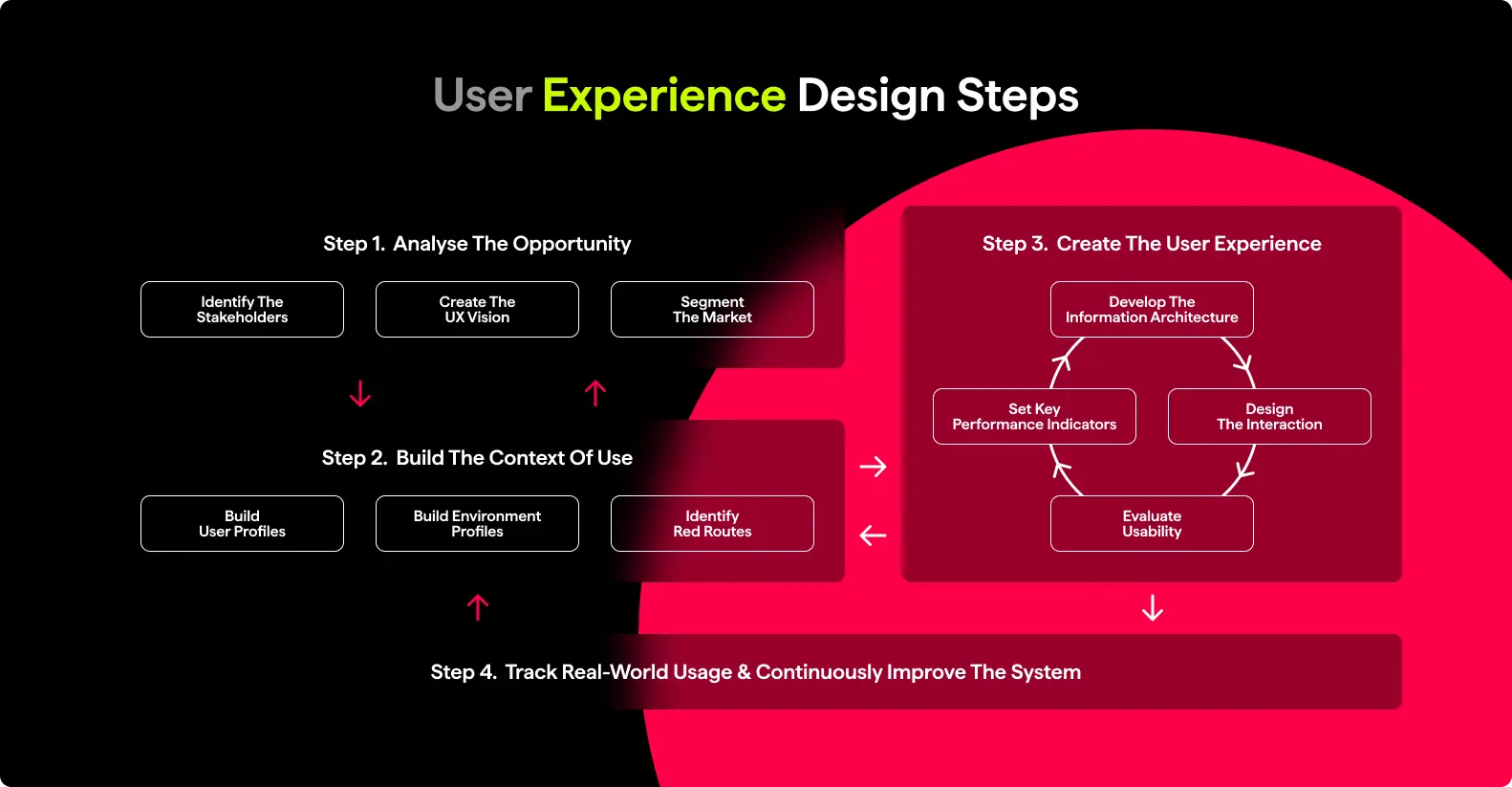
User-centred design is an iterative design process that prioritises the needs, wants and behaviours of the user at every stage of design and development. It involves analysis, such as identifying stakeholders, building the context of use by creating user profiles and identifying red routes, and creating the User Experience by developing informational architecture, evaluating usability and repeating the process.
There are 3 main principles to remember when it comes to user-centred design:
- Users are involved throughout the design and development.
- The design is driven and refined by user-centred evaluation.
- The design team includes multi-disciplinary skills and perspectives.
So what do we need to do to ensure users are considered throughout the process, what steps and tasks need to be taken? Let’s take a look!
Users In Context
A key term to remember when understanding your users is always thinking back to the ‘Context Of Use’, this is a description of the users tasks, equipment and physical and social environments in which a product or system is used.
Usability depends entirely on the context, you can’t design usable software, technology or websites if you do not understand the context of use, this is because as designers, you don’t:
- See things like your users;
- Know what your users know;
- Want what your users want, and;
- Work how your users work.
Finding out what users want seems so simple then right? Just ask them what they want…wrong! Users’ opinion is subjective and it is far too risky to make design decisions based on this, instead, observe your users in their environment. Find out the goals they are trying to achieve and how the users currently handle the task. What people say isn’t as useful as what people do, observing users and interviewing them while they work on their tasks and needs allows you to clearly see the parts they love about the system and the difficulties they come across.
Field Visits – Observing The User
To observe your users and discover their needs and behaviours, you perform field visits. Field Visits, or Contextual Inquiries as they are often otherwise called, allows you to find the people who really use the system, software or website you are working on, and gain insight into how they achieve their goals in a natural environment.
The context in how people perform tasks reveals information you maybe wouldn’t have thought to ask about. A key thing to remember is that users have a different set of knowledge to you, and may know very little about technology or a subject you are widely familiar with. At the end of the day, the best observations are things you’ve seen or heard – not your interpretations.
An observation could be anything from a direct quote, a user goal, an action they take, a pain point, or simply anything that surprised you when they attempted to perform their task.
Creating Personas – Designing For Specific Needs
The average user does not exist. Many design projects suffer from trying to design a system or website that fits the needs of every single person under the sun, but this is impossible to do. Instead of trying to please every single person, design for individuals with specific needs. You can do this by creating User Personas.
“I don’t know the key to success, but the key to failure is trying to please everybody.” – Richard Pryor
A User Persona is a user archetype or stereotype of a customer, created by analysing and organising your field study data into key takeaways of needs, wants and behaviours. They are not an “average” or a real user, but rather a cluster of multiple users with specific needs. 2-3 Personas are recommended to ensure you understand the most essential users with the most critical tasks, but how do you decide which persona is primary, secondary or even tertiary?
Simple! Would a solution for Persona A also let Persona B and C achieve their goals? If not, A is not the primary persona.
Would a solution for Persona B also let Persona A and C achieve their goals? If yes, B is the primary persona.
Personas are essential, as they place emphasis on specific users instead of ALL users, and by limiting and focusing choices based on these personas needs and wants, it helps make better design decisions. There are also some considerations with personas:
- Don’t have too many personas, they are designed to be focused on a range of specific users.
- Personas must be based on research, only create assumptions if you plan to test these with real users.
- Personas should be formatted as a story around a person.
Red Routes – Critical Journeys For Users
If personas are the operating room lights, then knowing who you’re designing for is like switching them on! Red Routes are the surgeon’s scalpel, they provide insight and understanding. Every application, system or website has a small set of blockbuster tasks that deliver a huge amount of value. Successful development teams focus on improving the usability for their users’ critical tasks.
In Central London there are a series of roads with red lines, which tells drivers that they cannot stop at any time, allowing traffic to smoothly flow through. Your website has red routes too! They are the critical “User Journeys” with the system. The sheer number of potential users can slow or even halt the design team’s progress, how can you understand everything everyone wants to do?
Red routes avoid this issue, as you focus on critical scenarios and tasks enacted by the key personas. Make the easy things easy, and the hard things possible!
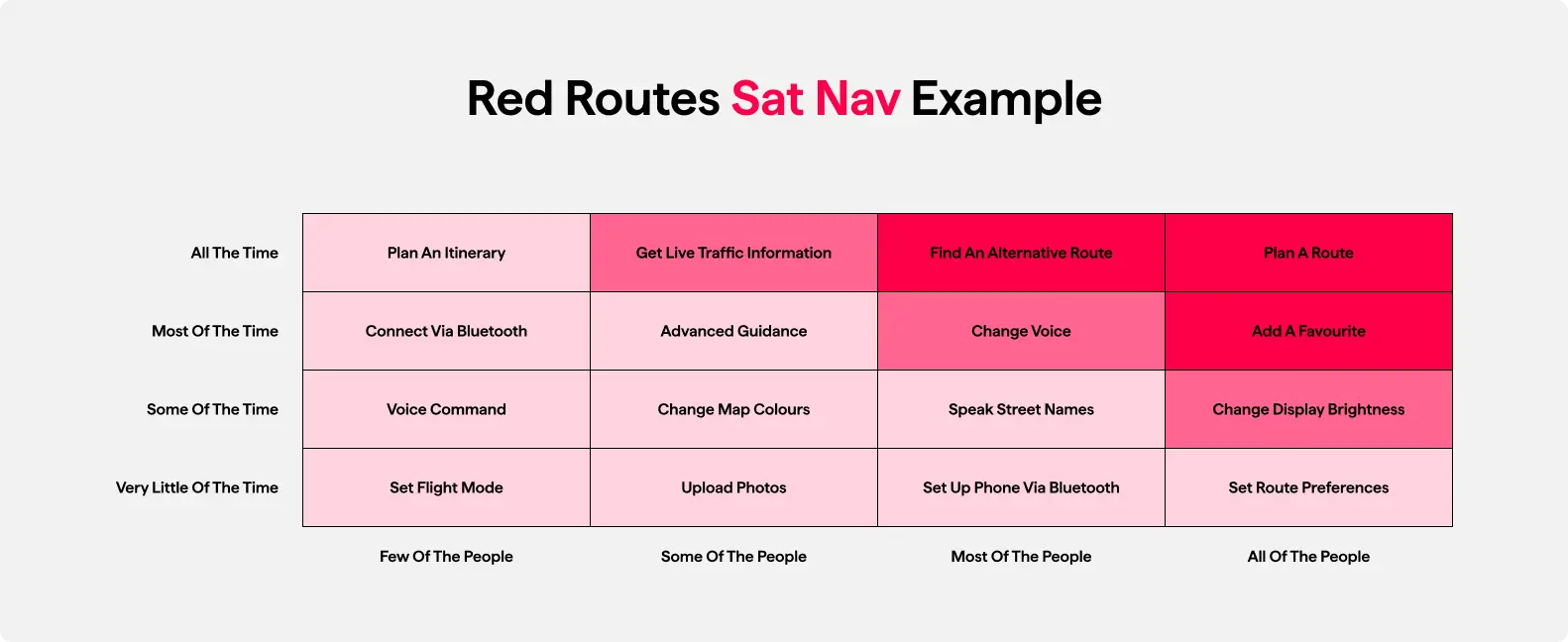
A good example would be to consider this; what are the red routes for a mobile navigation system such as Google Maps?
- Planning a route.
- Adding favourites.
- Changing the brightness.
- Alternative routes.
By gaining an understanding of these specific tasks that users need met, you can design a software that focuses on these critical systems, with secondary systems being moved out of the way to reduce “noise” for the user.
Usability Testing – Creating Prototypes For Users
Once red routes have been identified and the user personas are understood, you can create wireframe prototypes of your site to give to users in a form of usability test. There are two types of tests that can be done.
Formative Test
A form of iterative usability testing that aims to find problems with a system so they can be fixed.
Summative Test
A form of usability testing that aims to measure metrics such as effectiveness, efficiency and satisfaction.
So how are usability tests carried out?
A participant uses the wireframe prototype to carry out a set of pre-defined tasks by the observer, they are encouraged to think out loud while they do this to provide insight to the observer as to what they are thinking during each stage of the process.You can practice thinking out loud with them before beginning to ensure the participant is comfortable with the concept, and prevents any details being missed during the test if they lack the confidence to speak aloud.
It is essential to talk only when the participant has been quiet for a while. If the participant forgets to think aloud, you can probe them with questions or comments such as “What are you thinking?” and “Remember to think aloud.” to encourage them to speak on what they are doing while going through the test. This type of probing also prevents bias by giving questions that are open ended and do not lead the participant into going where you want them to.
All data, good or bad, is essential in a usability test, there are no wrong answers the participant can give, just ways to improve the system. Here are some points that make a good usability test:
- All wording and comments are expressed in the users language, don’t use jargon.
- Be realistic, i.e. describe things that the user would normally expect to be able to do.
- Don’t hint at the correct task, the purpose is to analyse the users behaviour in a natural environment and how they progress through the task.
- Have a correct solution to the scenario or task, so you know if the task was completed successfully.
- Have a poker face, users will naturally look to you for whether they have made the right decision, but you mustn’t give anything away that would lead them to an answer.
- If they question how a functionality is supposed to work, answer the question with a question.
- For example, a participant asks the observer “Where is this button supposed to go?”, the observer can respond with, “Where do you think this button goes?”
Iterative Design – Repeating The Process
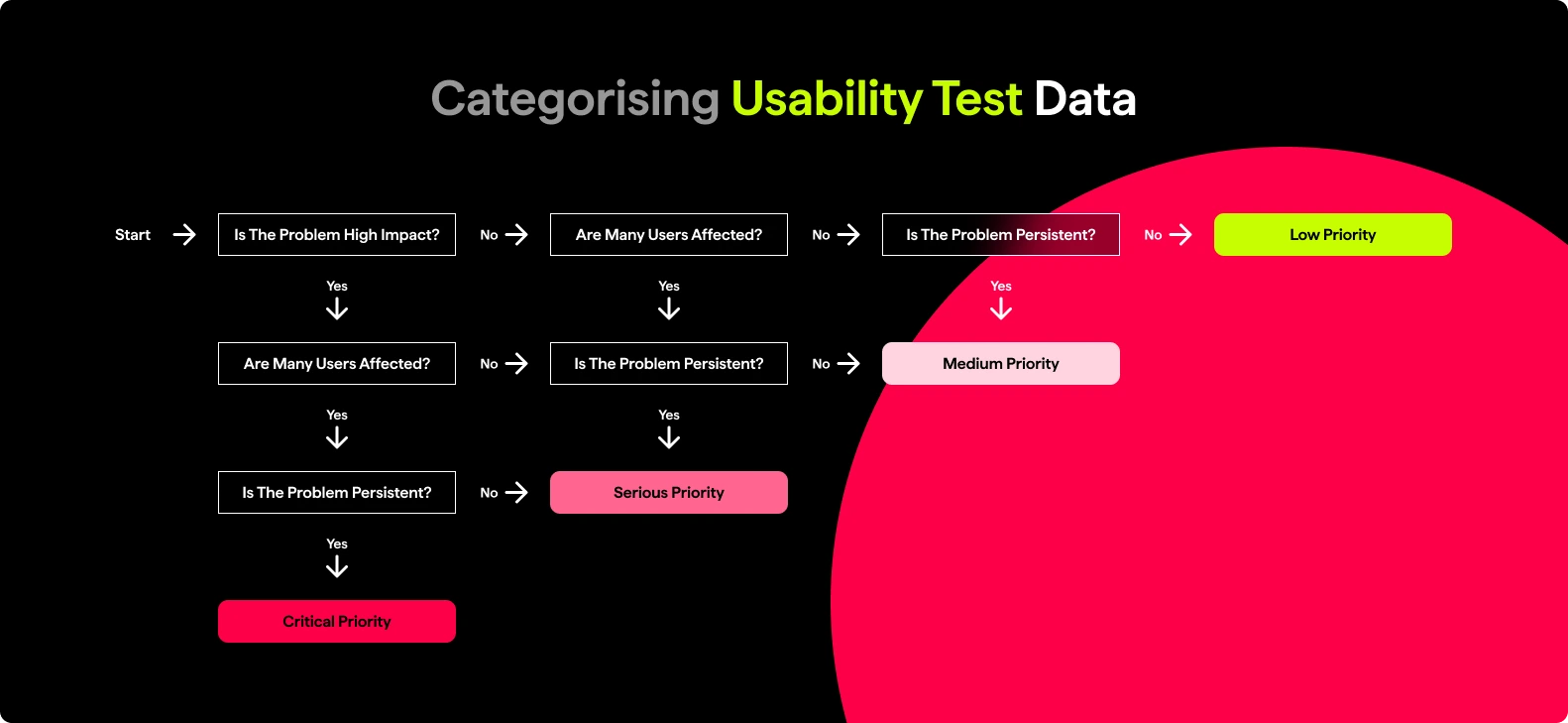
Once usability testing has been done, you can go back and analyse the data you found, what worked best and how many participants completed the task.You also can detail any problems that were found, such as ‘Is the problem of high impact?’, ‘Are many users affected?’ and ‘Is the problem persistent?’, and categorise these into Critical, Serious, Medium, or Low improvements or changes that need being made.
So…we’re done right? Not quite! When it comes to user-centred design, the task is never truly over. Even after you’ve done rounds of usability testing and tracking real-world usage, continuously improving software, websites or systems is essential to ensuring the users needs, behaviours and wants are always considered and met. It comes back to that term the ‘Context Of Use’, always consider who the users are, what tasks they will perform, the tools they would use, and the environment they are in.
This article only begins to scratch the surface of UX and Usability, as there are more finer details involved in each process that you can consider during user-centred design, from turning red routes into user stories, understanding effectiveness, efficiency and satisfaction in usability, card sorting and organising groups of data, to key usability heuristics for identifying problems within a design.
There is so much more in the world of user-centred design out there, but one key takeaway is this, user experience is all about making a system easier to use. It’s not about what you like, it’s what works for your users.
What does user centred design actually mean in practice?
User centred design is about building a site or product around how real people think, behave and complete tasks. It means involving users early, researching how they work in context, and making design decisions based on evidence rather than personal preference. You keep refining the experience through testing rather than assuming you got it right first time.
Did this answer your question? YesThat’s great glad we could help! Start a ProjectNoNo problem, one of our experts can give you a more in-depth answer. Ask our ExpertsWhy is the context of use such a big deal in UX?
Because usability depends entirely on the situation people are in when they use your site. You can’t design something usable if you don’t understand their environment, knowledge level, goals or constraints. Designers often assume users think and behave like they do, which is rarely the case. Observing users in real settings is the only way to bridge that gap.
Did this answer your question? YesThat’s great glad we could help! Start a ProjectNoNo problem, one of our experts can give you a more in-depth answer. Ask our ExpertsWhy can’t we just ask users what they want?
People will always give opinions, but opinions rarely reflect actual behaviour. What users say and what they do are often very different. Watching people complete tasks uncovers far more useful insights, because you see their workarounds, pain points and genuine goals rather than filtered answers.
Did this answer your question? YesThat’s great glad we could help! Start a ProjectNoNo problem, one of our experts can give you a more in-depth answer. Ask our ExpertsWhat are personas and why do they matter?
Personas represent groups of users with similar goals, behaviours and needs. They help you focus design decisions on the people who matter most rather than trying to please everyone. Good personas are based on research, not guesswork, and they keep the team aligned on who the primary user actually is.
Did this answer your question? YesThat’s great glad we could help! Start a ProjectNoNo problem, one of our experts can give you a more in-depth answer. Ask our ExpertsWhat are red routes in UX?
Red routes are the key user journeys that bring the most value. Every site or product has a handful of tasks that users absolutely must be able to complete quickly and without friction. Prioritising these routes keeps the design focused and prevents the experience from getting cluttered with secondary features that distract from what really matters.
Did this answer your question? YesThat’s great glad we could help! Start a ProjectNoNo problem, one of our experts can give you a more in-depth answer. Ask our ExpertsHow does usability testing fit into the design process?
Usability testing validates whether your ideas work in the hands of real users. You give participants tasks, observe how they approach them and listen to their thought process. The goal isn’t to lead them or fix things on the spot, but to understand what’s confusing or slowing them down. You then improve the design and repeat the cycle. It’s iterative by nature, not a one-off checkpoint.
Did this answer your question? YesThat’s great glad we could help! Start a ProjectNoNo problem, one of our experts can give you a more in-depth answer. Ask our Experts